
A UIS command task initiates a UIS command on a user-defined basis to one or more field devices. UIS commands must first be defined in the Device Definition Service (DDS); the MSS merely enables the choosing of specific ones to issue. The Can Schedule property of a UIS command must be selected in order for a command to be available for scheduling by means of the MSS. For more information, see Configuring a UIS Command.
The UIS Command Task property sheet enables you to specify the parameters by which a UIS command task resolves. A defined task resolves to the specified parameters and UIS service. In addition to set schedule polling where tasks are initiated on a predefined schedule, you can also set up polling to occur on a conditional basis and on a continuous basis.
The following diagram illustrates how UIS command tasks resolve to their respective remote devices:
For more information, see the subsections below:
See Scheduling a Task for information about configuring the Schedule property sheet for a UIS command task.
To Configure a UIS Command Task

The following examples illustrate common ways to configure a UIS task.
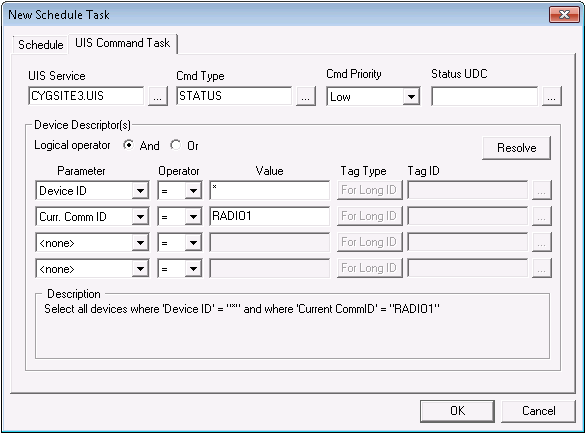
The following task shows that a STATUS command with Low priority is to be issued by the CYGSITE3.UIS service. The first Device Descriptor specifies all devices because Device ID uses a wildcard (*). The second Device Descriptor specifies a Curr. Comm ID value of "RADIO1". Because the logical operator used is And, all characteristics of both descriptors must be met. The result is that the task resolves to all devices that also have a current communication device ID of "RADIO1".
Conditional polling enables you to create a polling schedule based on the value of a specific tag. Conditional polling must be set up in conjunction with either duration or interval polling (see Scheduling a Task). Jobs are issued by duration or interval until a condition is met, then the appropriate task is executed in response to the condition. For example, if a poll is scheduled to run every 3 minutes and the conditional trigger for the poll is a high pressure, the job runs every three minutes but the task is only executed when the pressure becomes high.
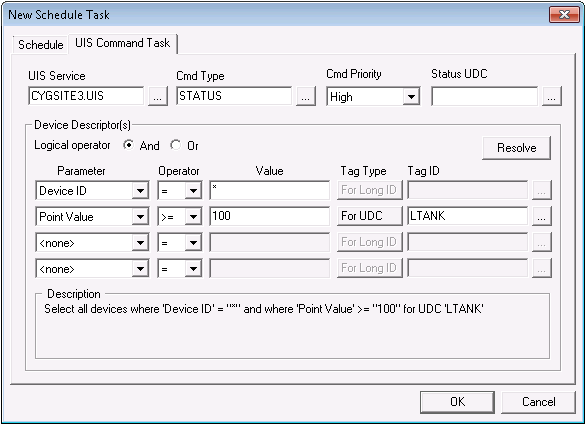
The following task shows that a STATUS command with High priority is to be issued by the CYGSITE3.UIS service. The first Device Descriptor specifies all devices because Device ID uses a wildcard (*). The second Device Descriptor specifies a Point Value greater than or equal to 100 for the specified UDC called LTANK (tank level). Because the logical operator used is And, all characteristics of both descriptors must be met. The result is that the job resolves to all devices that also have a UDC called LTANK, but a UIS command task is only issued if the point value for LTANK is equal to or greater than 100.
Depending on your communication infrastructure, it is possible to schedule jobs to execute at a rate that is faster than your pending UIS communication queue can handle. This is not an optimal situation. For example, you might schedule a command to poll every 60 seconds but your pending communication queue is only able to issue commands every 70 seconds. Over time, your pending communication queue might back up and exhaust UIS memory.
An optimal solution is to adjust your MSS schedule to poll with enough time to fully execute a UIS command. But this is not always practical. Another way to solve this problem is to set up a condition that regulates the maximum number of tasks allowable at one time in a pending UIS communication queue. When the number of pending messages in the relevant pending communication queue is down to an acceptable level, an MSS task is issued to the queue. When the UIS executes the next command, the MSS can send yet another task. And so forth. If configured properly, this method of polling ensures that messages do not back up in a pending communication queue to a level that causes the UIS to exhaust its memory. However, it does mean that you are not truly polling on the schedule configured in your MSS task; you are polling at a rate the UIS communication device can handle.
To View Communication Statistics
For more information, see Universal Interface Service and Viewing Communication Statistics.
To Adjust the Comm Queue to Avoid Over-Polling
Example
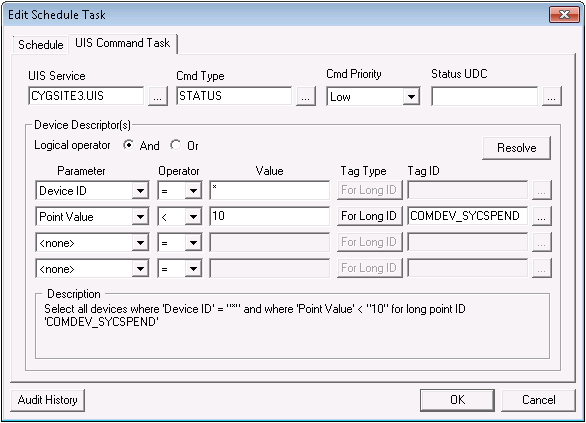
The following task shows that a STATUS command with Low priority is to be issued by the CYGSITE3.UIS service. The first Device Descriptor specifies all devices because Device ID uses a wildcard (*). The second Device Descriptor specifies a Point Value less than 10 for the specified long-point ID called COMDEV_SYCSPEND. Because the logical operator used is And, all characteristics of both descriptors must be met. The result is that the job resolves to all devices that share a communication device called COMDEV and a UDC called SYCSPEND, but a UIS command task is only issued when the point value for SYCSPEND is less than 10.
The following table lists and describes properties of the UIS Command Task property sheet.
| Parameter | Description | |||||||||||||||||||||||||||||||||||||||||||||||||||||||||||||||||||||||||||
|---|---|---|---|---|---|---|---|---|---|---|---|---|---|---|---|---|---|---|---|---|---|---|---|---|---|---|---|---|---|---|---|---|---|---|---|---|---|---|---|---|---|---|---|---|---|---|---|---|---|---|---|---|---|---|---|---|---|---|---|---|---|---|---|---|---|---|---|---|---|---|---|---|---|---|---|---|
| [UIS Command Task Information] | ||||||||||||||||||||||||||||||||||||||||||||||||||||||||||||||||||||||||||||
|
The UIS service that will process the task. |
||||||||||||||||||||||||||||||||||||||||||||||||||||||||||||||||||||||||||||
|
The command type (name). A command in the DDS must have its Can Schedule option enabled or it will not be listed. |
||||||||||||||||||||||||||||||||||||||||||||||||||||||||||||||||||||||||||||
|
The priority of a UIS command in the UIS communication message queue (CmdPriority). Cmd Priority options include:
Each higher priority trumps priorities lower than it. See Prioritizing Messages in the Communication Queue for more information about command priority. |
||||||||||||||||||||||||||||||||||||||||||||||||||||||||||||||||||||||||||||
|
Use this field to assign a status UDC to the UIS command task. Status monitoring affects the CygNet Studio UIS Command Button tool. See UIS Command Button for more information. This property is optional. |
||||||||||||||||||||||||||||||||||||||||||||||||||||||||||||||||||||||||||||
|
Device Descriptor(s) |
||||||||||||||||||||||||||||||||||||||||||||||||||||||||||||||||||||||||||||
|
Logical Operator |
Select And or Or to define your use of search parameters. |
|||||||||||||||||||||||||||||||||||||||||||||||||||||||||||||||||||||||||||
|
Resolve |
Once the Device Descriptors are defined, click Resolve to display a list of devices that match the Descriptors. |
|||||||||||||||||||||||||||||||||||||||||||||||||||||||||||||||||||||||||||
|
Parameter |
The Parameter specifies an identifier by which to resolve a command.
|
|||||||||||||||||||||||||||||||||||||||||||||||||||||||||||||||||||||||||||
|
Operator |
Select an available operator to define the relationship between a parameter and a value. |
|||||||||||||||||||||||||||||||||||||||||||||||||||||||||||||||||||||||||||
|
Value |
Enter a user-defined value. The Value field is not case sensitive. The wildcards "*" and "?" can be used when specifying a Value:
|
|||||||||||||||||||||||||||||||||||||||||||||||||||||||||||||||||||||||||||
|
The Tag Type buttons enable you to specify the type of tag that corresponds to the value entered in the Tag ID field. Options are as follows:
Simply click the Tag Type button to toggle between options. The Tag Type buttons only become available when used with the following Parameter values:
For more information, see Conditional Polling Example. |
||||||||||||||||||||||||||||||||||||||||||||||||||||||||||||||||||||||||||||
|
The Tag ID field enables you to specify a tag that corresponds to the selected Tag Type. Click the Browse button to open the Select Point dialog box for a list of available tags in one of three formats; formats correspond to that selected by the Tag Type button. The Tag ID field only becomes available when used with the following Parameter values:
For more information, see Conditional Polling Example. |
||||||||||||||||||||||||||||||||||||||||||||||||||||||||||||||||||||||||||||
|
Description |
An easy-to-read description of the descriptor rule(s) defined above. |
|||||||||||||||||||||||||||||||||||||||||||||||||||||||||||||||||||||||||||
|
|
|

